
Travel Town Auto Orders Not Working? Here’s How to Fix Them
Auto Orders refuse to appear no matter how many max items you craft? You search “Travel Town Auto Orders Not Working” and still get nothing useful.
But the good news? You finally found the solution you’ve been looking for.
In fact, Auto Orders are very important if you want to level up faster. Not only because they’re a decent source of coins which you use to unlock and upgrade village buildings:
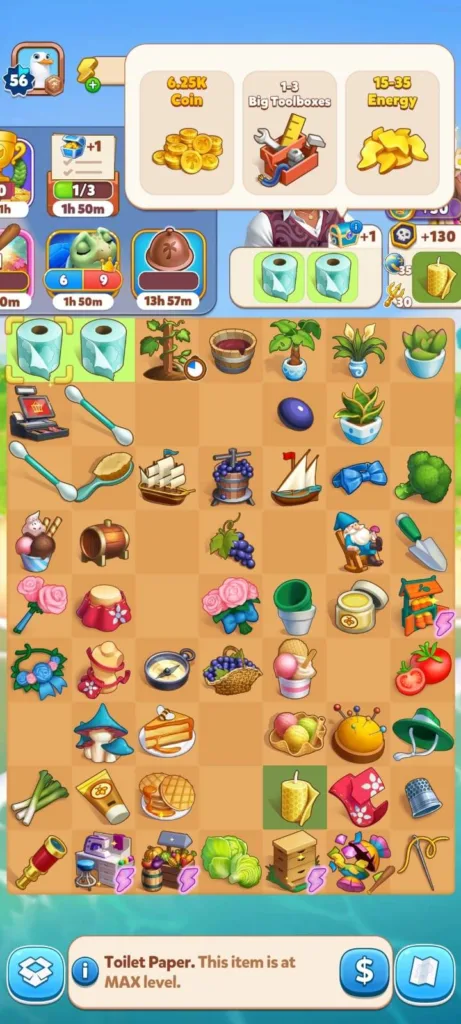
But Auto Orders also help you clear the board to get more space and produce new items too.
Honestly, the game gives you no warning when auto orders stop showing. You’re not doing anything wrong. You craft the right items. You reach the right levels. But still get nothing.
Thankfully, the steps you need to take to fix the problem are simple.
In this guide, I’ll show you how to get auto orders in Travel Town and make the coins flow again.
By the way, if you ever run out of energy while doing this, I’ve got a Travel Town free energy guide that can help.
Let’s dive in.
Complete the current Auto Order to reveal the next
Travel Town only displays one Auto Order at a time. This means you’ll see only one order in your bar (even if you trigger multiple Auto Orders at once) because the game uses a first-in first-out system, so the next won’t appear until you hand in the current order.
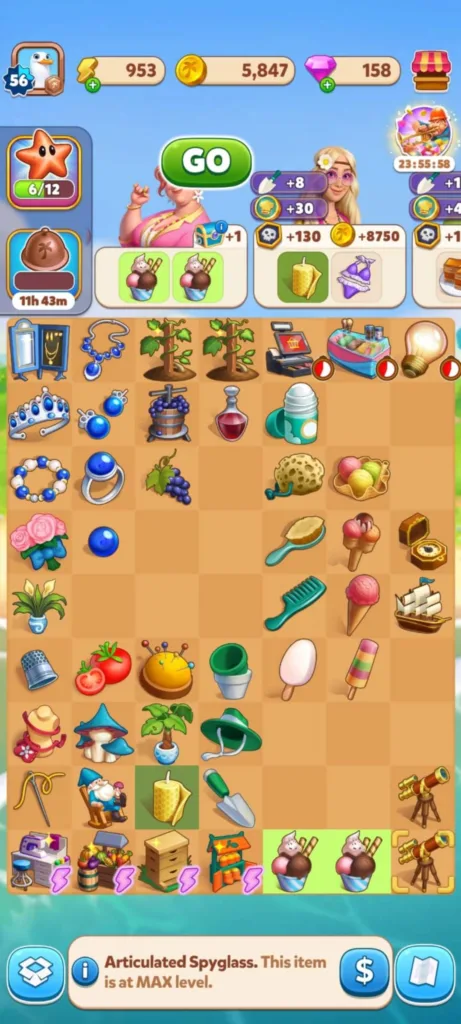
As you can see in the image below, I have two Deluxe Sundae items and two Articulated Spyglass items which are the max level in their chain. But only one Auto Order appeared instead of two, and the second order will appear after delivering the first one.
Clear any regular order that wants the same item
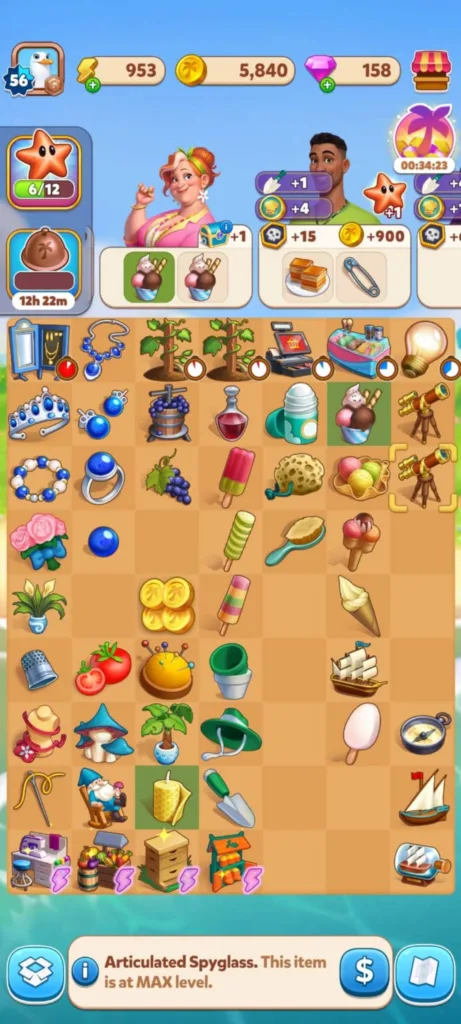
I was seeing some orders with dark green items while I was trying to trigger Auto Orders. I had no idea what those were. I thought they were just normal orders, and I was trying hard to get the auto orders. But that was pretty much impossible.
Until I realized that the item showing dark green is a villager request and it’s blocking Auto Orders from appearing. So whenever you see it. Clear it first. The auto order will appear after.
Remove max items from storage
We all put our high-level items in the storage, whether to get more space to keep producing new items or to keep them safe so we don’t delete or sell them by mistake.
And most importantly: We can get them back when we need them to fulfill those big value orders without rebuilding the whole chain.
But do you know that they can block the auto orders?
Yes they do. As you saw in the previous image, I was having an active Auto Order, but once I put one requested item in the Inventory, the Auto Order froze.
So make sure to check your Inventory and move the items back to the board and then the Auto Order will retrigger.
Confirm the chain and trigger requirements
Some chains in Travel Town don’t have Auto Orders. Others lose them after updates. So check first that the chain you’re working on actually supports Auto Orders before you spend your energy (to make sure you don’t waste it).
Then, make sure you’re crafting the final item in the chain at the correct amount. Meet these requirements and the auto order will show as soon as the game detects it.
Fortunately, I created this Travel Town Auto Orders list (with images) to make things a whole lot easier for you. So take a second look at it to see if you’re taking the right steps.
Restart the app to reset minor glitches
Closing and reopening the game refreshes the Auto Order queue. But if it still fails, try to fill a different order. And if that didn’t work, then reinstall the game as a last resort and contact the developers HERE.
Keep only one high-level auto producer on the board
This is a trick I learned on Reddit and guess what? Yes it works very well. Take the lower Auto Producers off the board and leave just one high-level version. Then restart the game, and the Auto Orders start working again.
Ready to Get Your Auto Orders Back Again?
Auto Orders might look mysterious when they stop showing up… but now you know exactly how they work and how to get them back again. Keep your board clean, finish what’s already in your order bar, clear any blocking villager requests, and craft the right max items in the right amounts.
Do that and your coins will start flowing again.
While you’re here, check out our other Travel Town guides:
- How to Get Free Diamonds in Travel Town
- How to Disconnect Facebook from Travel Town
- How to Get the Mysterious Fossil in Travel Town
- How to Add Friends in Travel Town
This guide helped you? Drop a comment below and tell me what fixed your issue and share this article with anyone who’s stuck, so they can get back on track too.

Developer: Moon Active | Magmatic Games LTD
Platforms: Android, iOS
Release Date: Feb 21, 2022
Mode: Single-player